5 min read
Tweet thread maker: write and schedule X threads in your voice
A tweet thread maker turns one idea into a series of connected posts on X. Postel drafts threads in your own voice from an idea, a link, a video or your notes, lets you edit each post and add media, and schedules the whole thread to go out at once. It also writes and schedules LinkedIn posts from the same workspace.
 Joschua SünnekeUpdated
 What is a tweet thread maker?
A tweet thread maker is a tool that writes and formats a Twitter thread for you: it splits an idea into posts that each fit X's character limit, writes a hook for the first post, and keeps the thread in order when it publishes. Postel's thread maker also writes in your voice, learned from your own posts, and schedules the thread for you.
What Postel's thread maker does
- Drafts full threads. Ask for a thread and Postel writes it post by post, from the hook to the last post.
- Writes in your voice. Postel learns your style from your X timeline or a public LinkedIn profile. You can also use Jarvis, Postel's built-in voice, or the style of a creator you follow.
- Writes from your material. Turn YouTube, TikTok and Instagram videos, articles, files and notes into threads. Postel can also search the web for a recent topic.
- Lets you edit every post. Change any post in the editor, ask Postel to rework one, and attach images, a video or a GIF to any of them.
- Schedules the whole thread. The thread goes out as one unit, in order, at the time you pick or in your next posting slot.
- Posts to X Communities. Pick one or more communities when you schedule.
- Turns threads into LinkedIn posts. Adapt a thread into a LinkedIn post, then edit and schedule it separately.
How to make a Twitter thread with Postel
Step 1: Connect X
Sign up and connect your X account, so Postel can learn how you write and publish for you.
Step 2: Ask for a thread
Describe the idea, paste a link or pick a source, and say you want a thread. For example: "a thread on the five things I'd do differently in our first year, from my notes".
Step 3: Edit and add media
Open the thread in the editor. Rework the hook, cut posts that don't earn their place, and add images or a video where they help.
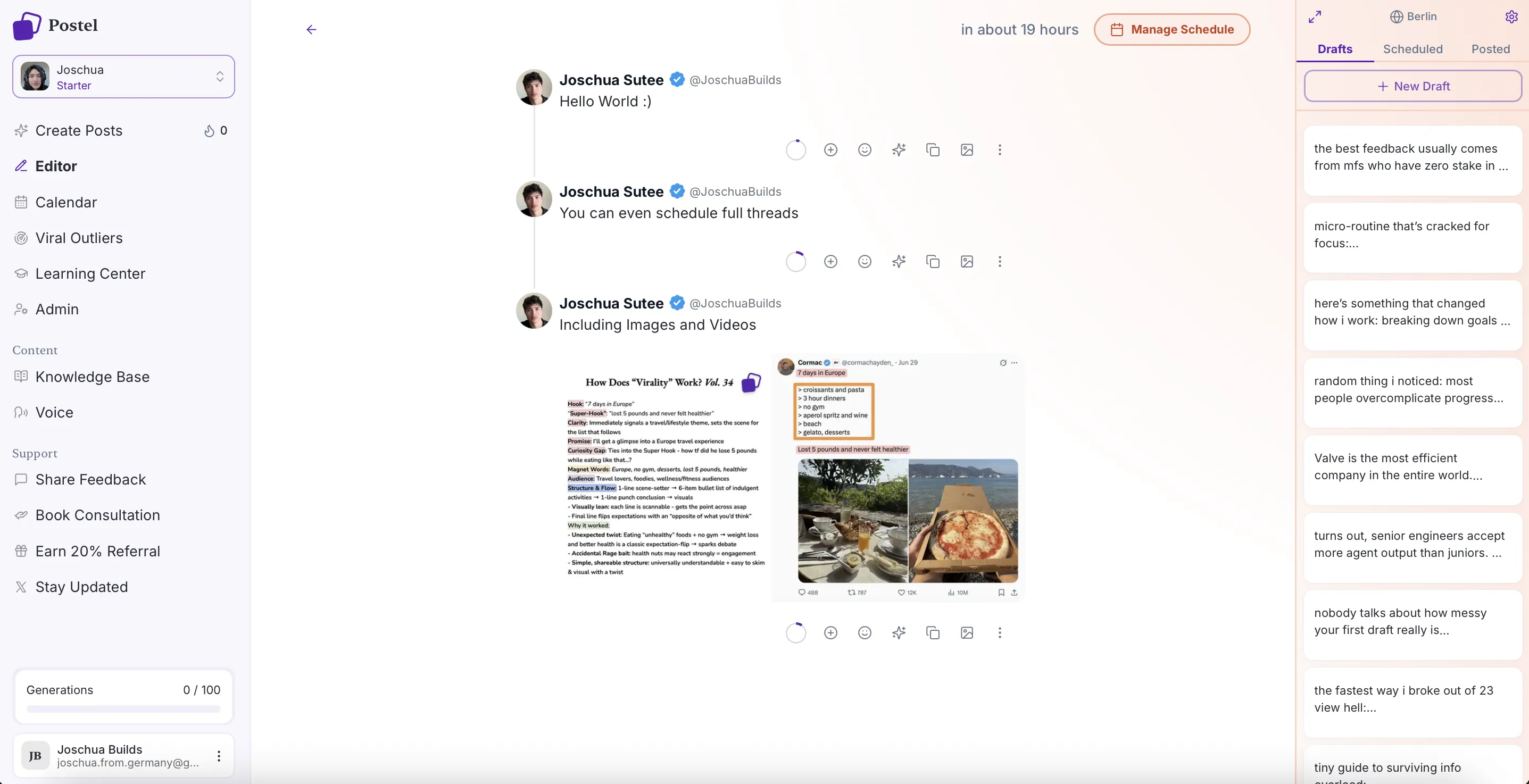
Scheduling a thread in Postel
Step 4: Schedule or post
Send the thread to your next free posting slot, pick a date and time, add X Communities, or post it now. Every scheduled thread shows up in the calendar.
Thread or single post?
| Single post | Thread | |
|---|---|---|
| Length | One idea, up to 280 characters on a free account | One idea in 5 to 10 posts |
| Best for | Takes, news, one lesson | How-tos, stories, breakdowns |
| Time to write | Minutes | An hour or more by hand |
| What decides reach | The whole post | The first post, the hook |
Twitter thread ideas that work
- Problem and fix. Name a problem your readers have, then walk through how you solved it.
- Before and after. Show what changed, with numbers, and what caused it.
- Mistakes and lessons. Share what went wrong and what you'd do now.
- A framework. Lay out a step-by-step approach people can copy.
- A story with a takeaway. Tell what happened, then end with what it means for the reader.
For real openers that drew 5,000 views or more, browse the Twitter thread examples.
Tips for better threads
- Put the payoff in the first post. Say what the reader will get, and end with a reason to keep reading.
- One point per post. Each post should make sense on its own.
- Cut the filler. If a post doesn't add anything, delete it. Most good threads run 5 to 10 posts.
- Add a visual. A screenshot, chart or photo makes a long thread easier to follow.
- End with a next step. Wrap up, or point people to where they can learn more.
- Post to communities while you're small. X Communities put your thread in front of people who don't follow you yet.
Pricing
- Starter: $29/month, or $19/month billed yearly.
- Professional: $49/month, or $29/month billed yearly. Adds weekly drafts: each week Postel writes posts for X and LinkedIn into a review queue, and nothing is scheduled until you approve it.
Both plans include threads, AI writing in your voice, sources and scheduling to X and LinkedIn. Both start with a 7-day trial. See pricing.
Frequently Asked Questions
How do you make a thread on Twitter?
Write your first post, then reply to it with the next post, and repeat. On x.com you can also tap the plus button in the composer to add posts before you publish. A thread maker like Postel drafts all the posts for you, keeps each one within the limit, and publishes them in order.
Can Postel write a whole thread for me?
Yes. Ask for a thread on a topic, or from a link, video or note, and Postel drafts every post in your voice. You edit what you want before anything goes out.
Can I schedule a Twitter thread?
Yes. Postel schedules complete threads, with media on any post, and publishes them as one unit at the time you pick. You can also send a thread to your next free posting slot.
How long should a Twitter thread be?
Most good threads run 5 to 10 posts. Make it as long as the idea needs and no longer. Every post should earn the next tap.
Can I add images or videos to a thread?
Yes. Attach images, a video or a GIF to any post in the thread in Postel's editor. The media is kept when the thread is scheduled.
Is there a free Twitter thread maker?
Postel's thread maker is part of the paid product, which starts with a 7-day trial. For free help, the Twitter thread examples library shows real openers you can copy as templates, and the free hook generator writes opening lines.
Related: